Tuesday, June 17, 2014

Flying Drone Buddies Can Capture Your Amazing Exploits

Flying Drone Buddies Can Capture Your Amazing Exploits

Flying Drone Buddies Can Capture Your Amazing ExploitsThe HEXO+ is designed for fast-moving action -- like skiing down a wicked steep mountain -- while the AirDog has more features for static sports or filmmaking, like "hover and aim," which lets it hover in one spot but move the camera to track the subject. You can also set it to slowly circle an area like a skate park or backyard -- or simply hover in one spot and look directly down to video.


There are two new crowdfunded projects that are building self-flying drones to follow you around and video your awesomeness. Geared for adventure sports like skiing, biking or motorcycle riding, these two drones will follow you at high-speed, capturing high-flying jumps and steep dives from angles previously available only to professional filmmakers with powerful cameras and helicopters.
For the outdoor adventure set, these flying cameras are simply insane.
Yet if you watch the video trailers for these projects, some of the coolest bits of footage are relatively mundane -- like a skateboarder slowly weaving down a sidewalk, or an inflatable boat with an outboard motor cutting a wake.
Since it was recently Father's Day in the U.S., imagine a father leading his kids across a grassy field with a frisbee in hand -- and that's it. Shot from the perspective of a flying drone,wow, suddenly the impossible-to-get perspective becomes real, giving amateurs a chance to get aerial shots they previously could only imagine, letting regular people evoke mood and anticipation like never before.
Photo main
The Automatic Flying Camera Drone Projects
The first of these two recent products is HEXO+ by Squadrone System.
The second is AirDog by Helico Aerospace Industries US.
In some ways, the two action-sports solutions are eerily similar: Both feature gimbals that hold GoPro cameras to deliver smooth video. Both will fly 40-plus miles per hour. Both will follow a subject autonomously, even landing on their own. Both feature iOS and Android apps to help set up flight parameters. Both have flight times of around 15 minutes per battery charge.
Both Kickstarter projects feature trailer videos with sick perspectives and inspiring footage.
Differences Between the Two Projects
One key difference between the projects is how the two drones track the subject. The HEXO+ connects to your smartphone using an optimized MAVLINK protocol, in addition to built-in trajectory anticipation algorithms that predict the next, most likely position of the subject. This helps create a more stable images that frame the subject.
The AirDog, on the other hand, uses a smartphone app to help you set up your flight plan, but the actual signals from the subject come from the AirLeash, which is a waterproof computerized tracker that sends signals to the AirDog to tell it where it is. The AirLeash can be worn on your wrist or strapped to a helmet, and it can even be used to help you adjust the flight or angle of the AirDog before you take off and do something cool.
Photo main

In addition to variations in the overall design -- the HEXO+ features six propellers and sleek aerodynamic design, while the AirDog uses just four propellers and looks like a brightly colored flying X -- the two have overlapping but slightly different target markets.

The HEXO+ is designed for fast-moving action -- like skiing down a wicked steep mountain -- while the AirDog has more features for static sports or filmmaking, like "hover and aim," which lets the AirDog hover in one spot but move the camera to track the subject. You can also set it to slowly circle an area like a skate park or backyard -- or simply hover in one spot and look directly down to video.
For situations with obstacles to avoid -- like trees or buildings -- you can run your course with AirLeash to record the position of your subject then use the smartphone app to adjust the trajectory of the AirDog.
Of course, both drones will also enable manual control, too.

The Rewards for Backers

The HEXO+ has a do-it-yourself kit reward for US$299. It features files for 3D printing, a list of components, the autonomous flight controller, and the smartphone app. The early bird base model is gone, but you can still back the HEXO+ for $599 and get a ready-to-fly drone with a stabilizing 2D gimbal with a GoPro mount (GoPro camera is not included).
For $699, you can get a ready-to-film pack, with a HEXO+ drone, gimbal with GoPro mount, and app, plus a GoPro Hero3 White Edition HD camera. To get the better quality GoPro Hero3+ Black Edition 4K camera, the price jumps to $999 (estimated retail price is $1,299).
The AirDog early bird option is gone. The next, and only, option is the AirDog unit itself -- not including a GoPro camera -- at $1,195 (estimated retail price is $1,500).

Will They See the Light of Day?

Both projects appear to have working prototypes and manufacturing timelines set up, greatly reducing the risk of a failed project (though some risk, of course, remains).
As for funding, the HEXO+ blew past its funding goal of $50,000. Backers have pledged more than $340,000 with nearly a month to go. And the timeline from backer to delivery? May 15, 2015.
In February, HEXO+ plans to spend a month testing with pro riders in action and release some of the greatest aerial footage clips. The team plans to make quality improvements in March with final testing and start of production in April.
The funding for AirDog and timeline is a bit different: AirDog backers have pledged nearly $130,000 toward a $200,000 funding goal with more than a month to go. As for delivery, AirDog plans a faster rollout -- AirDog units could make it into the hands of backers by November of this year.

Sunday, June 15, 2014

Pinguy OS Makes Gnome Desktop as Good as It Gets

Pinguy OS Makes Gnome Desktop as Good as It Gets

Pinguy OS Makes Gnome Desktop as Good as It GetsOS is easy to misjudge as being too basic for serious users. There is little to do but launch your applications and go about your computing tasks. It may not satisfy power users who like to control navigation with keyboard shortcuts and advanced system settings. However, if you are a normal computer user who just wants your system to work from the start, Pinguy OS has a lot going for it.
The Pinguy OS is a solid Linux distro with a focus on simple and straightforward usability for the non-geek desktop user.
This approach may disappoint those who favor newer user interfaces, but if you consider yourself a normal computer user who does not like to tinker with settings and various desktop environment options, Pinguy OS could be a good choice.
Pinguy OS is based on Ubuntu's 12.04 LTS release. It uses the Linux Mint infrastructure for package updates. Ubuntu's Software Center and the Synaptic Package Manager serve as the systems for adding or removing software.
The Gnome desktop is the only user interface option. However, Pinguy OS's developer, Antoni Norman, has tricked it out suitably with a Docky bar combination. The quick launch bar at the bottom of the screen and a hidden Places bar on the left edge make up for the loss of icon launchers from the desktop itself, thanks to Gnome.
Pinguy OS uses a standard GNOME 3 desktop environment for a straightforward computing experience. (click to enlarge)
The Gnome 3 user interface is a bit clunky compared to some of the newer desktop interfaces populating Linux distros. Still, the tweaking done here makes using Pinguy OS a more pleasant experience than it otherwise would be in Gnome 3.
Under the Hood
The latest version of this distro, dubbed "Papercut," was released May 20. It ships with Gnome 3.10, but you can easily upgrade it to Gnome 3.12.2 from the repositories.
Papercut runs on the Linux kernel 3.13.0. The default file manager is the Gnome Files 3.10.1 iteration. If you spend much time working with files, you should supplement this one-pane-only wonder with a more functional file manager such as Nautilus.
Pinguy OS has only one desktop flavor. This supports the developer's goal of making an uncomplicated desktop environment. However, you can choose the full version or the mini edition.
The mini option gives you fewer prepackaged software applications, but you can add the software that's not included with just a few mouse clicks.
Look and Feel
The goal of Pinguy OS is to give users an uncluttered desktop with a fine-tuned interface that works without confusion. It accomplishes that. It is a good out-of-the-box experience.
The simplicity starts with a bare-bones desktop background. Rather than letting users choose from a variety of colorful or plain-Jane images, the Pinguy OS automatically displays a collection of eye-catching artwork that randomly changes the background every five minutes or so.
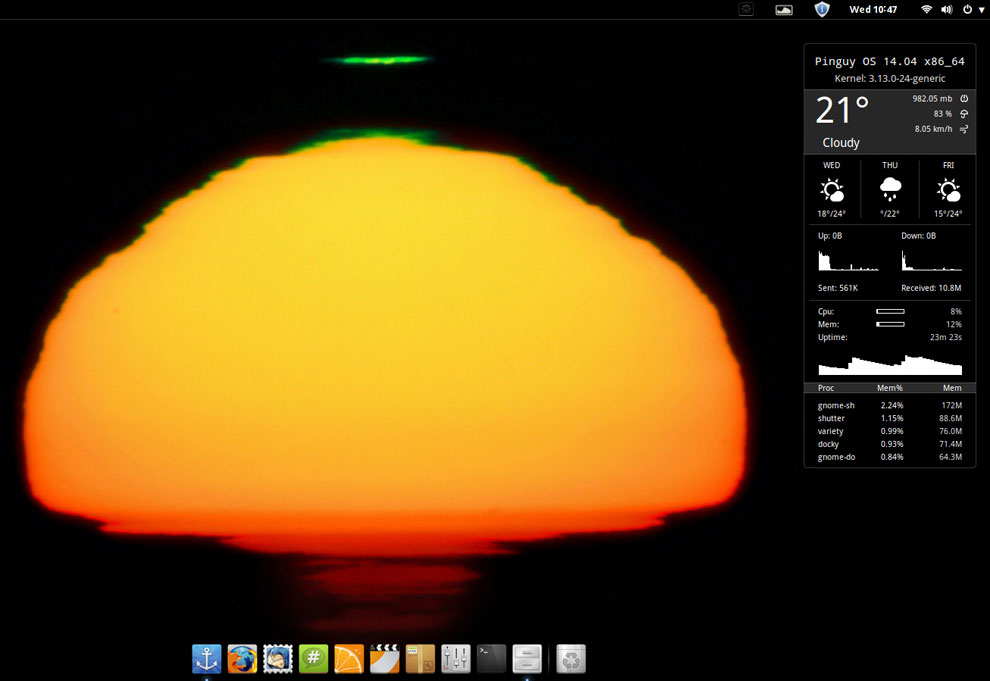
This sunset with dark silhouette is part of a collection of eye-catching artwork that randomly appears as desktop backgrounds during each computing session in Pinguy OS. (click to enlarge)
This process is controlled by the Variety application. You can change the timing interval and other options for the background images in the Variety Preferences panel.
The desktop itself is clutter-free. No icons can be placed there. The only item displayed is the Conky system monitor on the right side of the screen. It shows CPU, RAM, disk and other information.
Limited Desktop Functionality
The Gnome 3 desktop strives for simplicity. Functionality suffers.
A panel bar sits at the top of the screen. It holds the traditional menu button in the left corner and system notification icons on the right half of the bar. You can not add or remove any items from this bar.
A vertical Docky bar slides out from the left screen edge when you move the mouse pointer there. There's a modified Docky launch bar instead of a bottom panel bar.
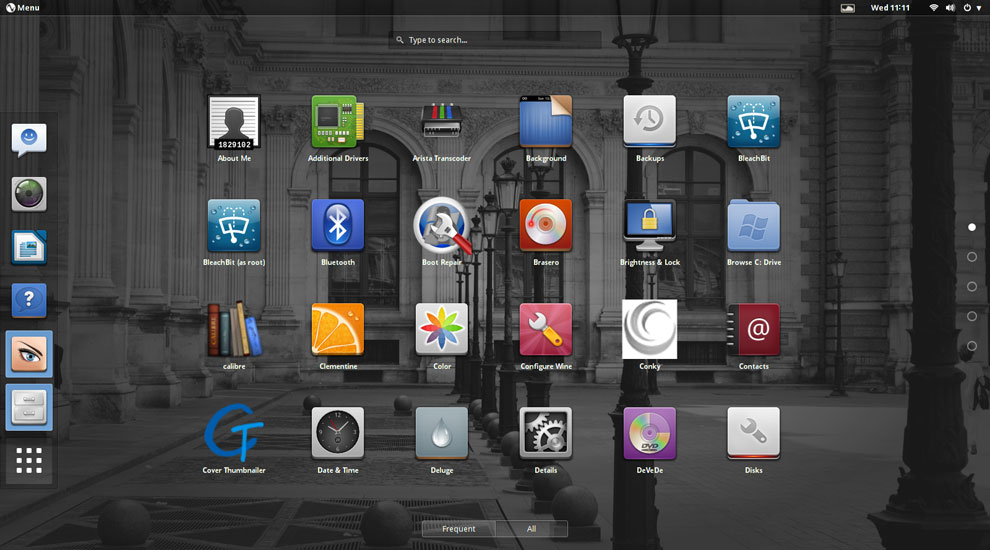
In addition to a drop-down menu and full-screen applications display, the Pinguy OS uses a modified Docky launch bar instead of a bottom panel bar. The desktop includes a Conky system monitor display on the right side of the screen. (click to enlarge)
The Gnome desktop uses a full screen display to show installed applications. Right-clicking on an icon places the launcher on the Docky bar as a favorite item. An icon on the Docky bar lets you make some limited configuration changes

Stock Software

No quick-start software options are provided for other browser choices, so you have to install what you want through the Ubuntu Software Center or the Synaptic Package Manager.
The only Web browser preinstalled is Firefox, but it includes numerous plug-ins by default. The LibreOffice suite also is provided by default.
Game availability is a weak spot on most Linux distros. This distro takes a minimalist approach. No games are preinstalled. However, the main menu provides a launcher for the PlayOnLinux and the Steam websites.
The other standard menu categories have a spattering of typical Gnome applications. If you are not familiar with these stock desktop titles, you no doubt will opt to replace them with your preferred computing software.

Ready to Go

Pinguy OS caters to the Gnome application standards, but the developer has added repositories and enhancement packages, which provide more software flexibility than the more limited Gnome options.
For most users, the tweaking offers most, if not all, of the packages needed to enjoy video, music and Web content. Some of that success comes from Flash and Java plug-ins already installed.
So you will not have to add extra codecs or specialized software and then struggle to configure them. This all contributes to a pleasant user experience from the first time you run Pinguy OS.

Bottom Line

Pinguy OS may not satisfy power users who like to control navigation with keyboard shortcuts and advanced system settings. However, if you are a normal computer user who just wants your system to work from the start, Pinguy OS has a lot going for it.
This distro is easy to misjudge as being too basic for serious users. I found it much easier to use than other desktop environments. I also found it much less frustrating to set up. There is little to do but launch your applications and go about your computing tasks.
My only dislike is based on my work routine preferences. I run numerous programs categorized on as many as four or five virtual workspaces. I switch among them continuously.
That does not happen conveniently here. The blame falls to the way the Gnome desktop is structured. Pinguy OS is merely the delivery vehicle. The developers have pushed the envelope as much as the Gnome architecture permits without stuffing a separate user shell on top of Gnome like other distros do.

Saturday, June 14, 2014

Samsung Debuts Thin New Tablets With Killer Screens

Samsung Debuts Thin New Tablets With Killer Screens

Samsung Debuts Thin New Tablets With Killer ScreensSamsung's claim that the Galaxy Tab S line has the most advanced display technology is true, said IHS iSuppli's Sweta Dash. Its 8.4-inch tablet offers 359 ppi, compared to the Kindle Fire HDX's 339 ppi. The 10.5-inch Galaxy Tab S offers 288 ppi compared to the iPad Air's 264 ppi. OLED tech enables thinner devices than LCD and a better contrast ratio. However, it costs more to produce, too.


This line "is setting the industry bar higher for the entire mobile industry," said JK Shin, CEO and president of Samsung Electronics' IT & Mobile Division. "It will provide consumers with a visual and entertainment experience that brings colors to life, beautifully packaged in a sleek and ultra-portable mobile device."
The launch comes at a time when it's widely perceived that the demand for tablets is slowing;IDC, for instance, has lowered its forecast for 2014 tablet sales.
"We're not seeing tablet shipments or sales decline," said Jeff Orr, senior practice director for mobile devices at ABI Research.
However, the growth of the category is slowing because advanced mature markets -- the U.S., Europe and Japan -- are pretty much saturated and "are moving towards replacements rather than first-time purchase of devices," Orr told
Galaxy Tab S

Tech Specs for the Tab S Line

The Galaxy Tab S devices use WQXGA Super AMOLED displays with a resolution of 2560 x 1600 pixels and a 16:10 ratio.
The screens deliver more than 90 percent of Adobe's RGB color coverage, according to Samsung. They have a 100,000:1 contrast ratio, which provides deeper and more realistic images.
Further, the screens' Adaptive Display feature intelligently adjusts gamma correction, saturation and sharpness based on the application viewed, the viewing environment's color temperature, and the ambient lighting.
The Galaxy Tab S devices also use advanced outdoor visibility technology that makes it easy to view content outdoors in bright sunlight, Samsung said.
Both the 8.4- and 10.5-inch tablets are slim -- measuring 6.6 mm deep -- and have extended battery life because Super AMOLED technology does not require a backlight.
Users can make and receive calls directly from their phones to their Galaxy Tab S devices with call forwarding. They also can surf the Web, watch videos, share content and make calls simultaneously.
The tablets, which will be available in WiFi-only, LTE-only, and both WiFi and LTE versions, have a Quick Connect feature that finds and connects to nearby devices for easy content sharing.
They will be available in July. The tablets can be preordered from a number of outlets, including Sears, Best Buy and Amazon, at a price of US$399 for the 8.4-inch and $499 for the 10.5-inch WiFi models.

Breaking Down Screen Issues

Samsung's claim that the Galaxy Tab S line has the most advanced display technology is true, but the Kindle Fire HDX gives them a run for their money, Sweta Dash, director of display research and strategy at IHS iSuppli, told TechNewsWorld.
"Their 8.4-inch tablet offers 359 ppi, which is higher than what we have up to now, and the 10.5-inch 288 ppi, but the Kindle Fire HDX offers 339 ppi," Dash pointed out. The iPad Air offers just 264 ppi.
Samsung "spent a good amount of time during its launch event talking about tablet usage and how long-form video is increasingly used, leading to the desire for the highest-quality displays available," ABI's Orr said.
OLED technology enables thinner devices than LCD screens because it doesn't require backlights. It also offers a better contrast ratio, especially when viewing videos, Dash said.
Galaxy Tab S
However, OLED screens cost about 10 percent to 30 percent more to produce than LCD screens, Dash said.

Possible Demand for Galaxy Tab S Devices

The Tab S line constitutes Samsung's higher-end models, and will target a different audience than the Galaxy Note and Galaxy Tab lines, Orr remarked. Prices of the Tab S line "are in line with this expectation."
However, the demand for high-end products with QXGA then comes into question, iSuppli's Dash suggested.
"Wide QXGA is nothing new in LCD, but only a small part of the market buys these high-end products," she said. "Most of the market buys low-end or mid-range devices."

Friday, June 13, 2014

Next iPad May Be Loaded With iPhone Hand-Me-Downs

Next iPad May Be Loaded With iPhone Hand-Me-Downs

Next iPad May Be Loaded With iPhone Hand-Me-Downs

Tablets evolved very quickly, and now they've gotten to a level that's pretty darn good.
... I think the reason they're starting to take a hit is that people are realizing they don't need to upgrade because there isn't enough change to make a difference," said Bob O'Donnell, chief analyst at Technalysis. "Even the iPad Air ... didn't do as well as a lot of people expected it to do."

In large families, it's common to pass on an older child's clothes to a younger one. The same is true in the Apple product family. It's common to pass on features introduced in the big brother iPhone to the little brother iPad. That appears to be the case with the next-generation iPad Air -- if the latest gaggle of rumors are to be believed.
"Historically, there's been a relationship between the iPhone and iPad product launches in that the iPad inherits what was most recently introduced on iPhone," Jeff Orr, senior practice director for mobile devices at ABI Research, explained to TechNewsWorld.
"What we haven't seen to this point is new advancements appearing on the iPad and then making their way over to the iPhone," he said.
The next iPad will get Apple's Touch ID fingerprint reader and a camera upgrade to put it on par with the iPhone 5s. The front-facing camera will be bumped from 1.2 megapixels to 1.5 MP, and the rear-facing camera from 5 MP to 8 MP. It also may support a dual LED flash, burst mode for stills, and a slow motion mode for video.
It's likely to receive the same processor upgrade that the next iPhone is expected to get, moving from the dual-core, 64-bit A7 chip to the quad-core A8 chip. Since the A7 already outperforms many mobile quad-core chips from other manufacturers, the prospect of an Apple quad-core processor is building anticipation among some of the company's fans.

Growth Slowing

So it seems that most of what will be new in the next iPad will be old hand-me-downs from the iPhone. That could affect the product's greeting in the market.
"Audiences that are fans of Apple products expect the company to innovate and to constantly revolutionize their experiences with these devices," Orr said.
Apple's challenge in the tablet market that it created is shared by the market as a whole -- sales are slowing. For the quarter ending in April, Apple saw a 16 percent decline in tablet sales compared with the same period in 2013, according to IDC data. The overall market didn't do much better, growing at a disappointing 3.9 percent during the previous 12 months.
"Tablets evolved very quickly, and now they've gotten to a level that's pretty darn good. ... I think the reason they're starting to take a hit is that people are realizing they don't need to upgrade because there isn't enough change to make a difference," Bob O'Donnell, founder and chief analyst with Technalysis, told TechNewsWorld.
"Even the iPad Air, which was a big improvement over previous iPads, didn't do as well as a lot of people expected it to do," he added.
Sales -- especially for the iPad mini -- also may be hurt by competition.
"They've got a lot of competition in the smaller-size segment where there is a large price gap between the 7-inch Android devices and the mini," Ross Rubin, principal analyst with Reticle Research, told TechNewsWorld.

OS-Driven Upgrades

Getting people to upgrade their hardware has been challenging since the invention of the PC.
"One way that Apple has addressed that previously has been with operating system updates," Rubin explained. "While they generally will run adequately on old hardware, they'll run best on the latest and greatest hardware."
Such an operating system update will be released around the time of the next iPad. While the next iPad may be thin on new features, the next iOS is not, so the tablet may get some sales legs from the new operating system.
Indeed, the future of innovation on the iPad may rest not with the hardware but with software developed for it.
"The radical departures aren't going to be from the hardware platform, but at the system level in terms of software, iOS and APIs," ABI's Orr said.
"Apple can't solve the needs of every market and every audience," he noted, "so by enlisting the support of its developers, they can extend the capabilities of iOS and the iOS devices to do more."

Monday, May 12, 2014

Samsung Invests $2B in Biopharmaceuticals

Samsung Invests $2B in Biopharmaceuticals


Samsung Invests $2B in Biopharmaceuticals


Today in international tech news: Samsung -- the smartphone-TV-camera Samsung -- is investing at least $2 billion in biopharmaceuticals. Also: Nintendo apologizes for its exclusion of gay options in an upcoming videogame; unprecedented technology will take center field at the World Cup; Comcast courts partnerships with Asian cellphone operators; and an Australian state will fine anyone using Uber.

Samsung Group, the world's leading smartphone maker, is investing at least US$2 billion in... biopharmaceuticals?
With this foray into the drug industry, Samsung hopes to become a major player in biotechnology, which is expected to be a booming industry in coming years.
A key component of this play is so-called biosimilars -- cheap versions of brand-name biotechnology drugs that no longer are protected by patents. Samsung plan to sell its first biosimilar product, a version of the arthritis therapy drug Enbrel, in Europe in 2016

Breaking Down the Crazy Apple-Buying-Beats Riff

Breaking Down the Crazy Apple-Buying-Beats Riff

Breaking Down the Crazy Apple-Buying-Beats RiffWhat if Apple wants to manage and sell Beats Music subscriptions itself? Right now, you can order Beats Music through AT&T, and it's available through other U.S. mobile networks and carriers. When Apple saw those deals happening, I'm sure there was a mad scramble in Cupertino. Was Apple supposed to let the cellular service carriers collect the revenue for side-stream products without a fight?

The hottest -- and possibly craziest -- tech rumor of the week is, hands down, that Apple is in negotiations to acquire Beats Electronics for US$3.2 billion.
First reported by Matthew Garrahan and Tim Bradshaw of the Financial Times, the story has been fanned into a raging inferno faster than a wildfire on a hot August day. Unfortunately, the only cited source for the rumor is "people familiar with the deal."

The Basic Beats Deal

On the surface, the deal to acquire Dr. Dre's and Jimmy Iovine's Beats Electronics would give Apple a popular line of cool headphones as well as a nascent streaming music service, Beats Music, which is designed around paying subscribers. Individuals pay $9.99 per month, while a family of five can get it for $14.99 each month.
The premise behind Beats Music is curated playlists created by DJs who live and breathe music. Finding the right stream for each person has been the challenge for years, especially when a single person's own tastes can change not only from day to day but within a day: Who hasn't busted a move to a song in the morning and later that day couldn't skip it fast enough?
Mood music, baby. Contextual. With Beats Music, you craft a sentence to describe your location, how you feel, and whom you're with. For instance, you would build a sentence through preconfigured labels for something like this: I'm ON A BOAT and feel like GOING BACK IN TIME with MY FAMILY to VINTAGE SOUL & FUNK.
Apple doesn't have this.
Apple's iTunes Radio lets you create a basic radio station, which supposedly learns from your preferences, letting you note the kind of song you would like to play more of -- or never play again. Apple's solution is good, but it's not fantastic -- and it sure as heck isn'tinsanely great.
Still, Beats Music is an app that runs on the iPhone, so Apple already has it anyway -- just no cut of the revenue.
Meanwhile, iTunes downloads fell 2 percent to $3.93 billion, which signals the first annual decline since iTunes launched in 2003. On the other hand, streaming music revenue in the U.S. grew 39 percent, generating $1.4 billion in revenue, to account for 20 percent of the recorded music industry's business, Billboard reported.
If you do the math -- no matter how the notes are shifting -- the music business representspocket change to Apple, which generated $170 billion in 2013.
Worse, even if Beats is fantastically successful, Apple's customers are still happily using their iPhones. Even if a rival like Google (or the burgeoning Amazon) rushed out to buy Beats and somehow made it exclusive, Beats Music wouldn't be enough to get millions of people to ditch their iPhones.

Desperate to Buy Cool?

Another flavor to this rumor is that Apple suddenly is desperate to buy cool. The problem with this statement is that it goes against the DNA of Apple: Apple doesn't buy cool. Apple buys intellectual property, the people behind innovative little companies. Apple doesn't buy things that it already essentially has.
No matter how uncool Tim Cook might seem to be, he doesn't seem to be the type of stodgy old man who wants to buy someone else's creation to add to the Apple family of products -- especially not to be cool.
It would be such a huge departure -- with little practical monetary upside -- that there would have to be a much better explanation.

Leak or Misinformation?

It's unlikely that the Financial Times reporters simply made this stuff up. They likely had a source -- but was that source tapping into the truth? What if the source was working with faulty -- even planted -- information? What if that source is now fired?
So how could this deal actually make sense?
First, Apple has a tendency to create innovative new ways for hardware and software to work together. If Apple is creating new wearable technology that needs a new hardware specification -- say a new plug for headphones -- getting Beats to build it into its line of popular headphones would be smart.
If Apple had to pony up the cash to retool a manufacturing system to make it happen, that would make sense. Heck, Apple did something similar for its sapphire glass efforts, so why not for popular headphones?
Of course, Apple could simply build special new headphones itself, right? Sure, but why stop there? Consider Apple's new CarPlay initiative. It lets car manufacturers create their own interfaces to Apple's tech. This is a relatively new move, a loosening of typical Apple control. It's not a leap to imagine Apple wooing Beats to incorporate or use some new Apple tech.
Second, what if Beats Music has an important patent, technology, or special transferrable music license? What if Apple's music man Eddy Cue -- who reportedly is in discussions with Beats -- learned this from Iovine?
While possible, all of it seems a bit unlikely, especially the licensing: If the music industry has such a love-hate relationship with Apple, wouldn't it ensure that Apple couldn't simply buy specialized streaming rights from Beats Music?
There's a smarter option that still makes sense: What if Apple wants to manage and sell Beats Music subscriptions itself? Right now, you can order Beats Music through AT&T, and it's available through other U.S. mobile networks and carriers. When Apple saw those deals happening, I'm sure there was a mad scramble in Cupertino. Was Apple supposed to let the cellular service carriers collect the revenue for side-stream products without a fight?
Having significant third-party subscriptions processed through carrier monthly billing processes is a competitive landscape-shifting move that Apple would recognize -- especially if Beats Music should turn out to be utterly fantastic.
Apple has to be fighting to ensure that the carrier-driven subscription model does not become a default model for Beats Music -- or worse yet, for any industry.
On the upside for Beats Music, instead of working with AT&T, what if it could get Apple to manage its subscription service? What if Apple rolled out the service across the world, letting Beats Music do its thing, while Apple just gave Beats Music a huge worldwide channel boost to hundreds of millions of iTunes accounts?
Apple has access to an incredible base of customers who happily buy content through their iTunes accounts -- and through their iPhones. Even if Apple should manage to retain a 30 percent cut of the revenue, there would be no other way Beats Music could rocket out to the world as quickly as it could through Apple.
That's a win-win situation. Worth $3.2 billion? Hard to say, but at least it seems to make sense for both Beats and Apple

Saturday, May 10, 2014

Adobe Voice Can Make You a Better Storyteller

Adobe Voice Can Make You a Better Storyteller

Adobe Voice Can Make You a Better Storyteller
Voice-overs for pages are performed by touching a microphone button on your iPad's display. Recording stops when you remove your finger from the screen. A nice feature of Voice is that it will sweeten the audio it records with the iPad's microphone. The process adds richness to your voice. However, it won't work miracles, so don't expect your pipes to be transformed to those of James Earl Jones


If you have a story to tell -- even a dull one -- Adobe Voice can improve your presentation. The free app can't make your story more compelling, but it can give you a better shot at getting it across. Adobe Voice is available for the iPad 2 and above running iOS 7.

To kickstart your use of Voice, Adobe offers a welcome page with a pair of sample slideshows to give you an idea of how others have used the app. One video is an inspirational message from a mother to her daughters about living a happy and empowered life. The other is a promo for a line of clothing.
Adobe Voice
There's also a tutorial -- it appears to be made with Voice -- for using the software. It provides the essentials for creating a short video in Voice. Every story is made of pages, and your voice tells the story on each page. Every page has an image or graphic to illustrate your story. Finished videos can be shared with others.

A Little Prodding

When you start a story, you'll be asked for a title. If you don't have one, you can skip that step. If you don't have a video topic in mind, Adobe helps you out with suggestions in categories like personal, business, causes, school, greetings, tales and instructional.
For example, in personal there are ideas such as "the best party ever" and "when I made a wrong choice." In business, there's "key accomplishments for the quarter" and "annual report in one minute." School topics include classics such as "what I did on my summer vacation" and "summarizing Hamlet in 60 seconds."
Once you have an idea and title, Voice helps you structure the story in your video. It includes eight story arcs -- promote an idea, for instance, or tell what happened, explain something, follow a hero's journey, or teach a lesson -- but you're not locked into any of the story arcs. You can always choose to make up your own.
When you create your first video, Voice will provide you with screen prompts for creating content on a page. You can turn that off by choosing "skip tutorial" when you begin a video.
Voice-overs for pages are performed by touching a microphone button on your iPad's display. Recording stops when you remove your finger from the screen. You can instantly review what you said and record it again if you don't like what you hear.
A nice feature of Voice is that it will sweeten the audio it records with the iPad's microphone. The process adds richness to your voice. However, it won't work miracles, so don't expect your pipes to be transformed to those of James Earl Jones.

Give It a Look and Feel

After you've recorded your voice-over for your page, you'll be prompted to add an icon, photo or text. Unfortunately, video can't be imported into the program.
Voice has a library of more than 25,000 icons and access to some 100,000 quality stock photos on the Web.
A great feature about Voice is that its photo searches of the Web returns only royalty-free photos, so you don't have to worry about rights violations when you use them in your video. What's more, Voice automatically will create the proper credits for the photos you use and tack them to the last frame of your video.
In addition to using photos from the Web, you can import pics into the app from your iPad or Adobe Creative Cloud, Facebook or Dropbox accounts. You can also snap shots with your iPad and bring them immediately into a page.
As you add pages to your video, thumbnails will appear on a timeline on the bottom of your iPad's display. You can move through the timeline by dragging your finger on it. Tapping a thumbnail lets you jump to that page to edit it.


Voice also gives you some options for controlling the overall appearance of your video. For example, it gives you a number of choices for slide layouts. You can place two objects on a page, for instance, or an object and a caption or an object and a full photo.
More than 30 themes are included with the program. A theme is primarily an assortment of background colors for your slides.
Voice also will lay a musical soundtrack behind your video. Some 35 musical pieces are included with the program organized into categories such as happy, playful, relaxed, rousing, thoughtful and uplifting.
Although for now you're limited to the musical library in Voice for your video's score, the next upgrade of the program reportedly will allow users to use their own tune collections in the program.

Fast and Fun

When you finish your video, you'll want to share it. Voice lets you upload your video to Facebook and Twitter. You also can share it via email or instant messaging, but first you have to upload it to the Adobe Voice website, which easily can be done from within the app. Messages and emails touting the video will contain a link to view it at the Adobe site.
Not being able to export a slideshow in a video format -- MP4, for instance -- is disappointing and seems like a gratuitous restriction on the fruits of a voice user's labors.
Another annoyance is that it doesn't support landscape mode. I like to have my iPad at a slight angle when working with it on a tabletop. My iPad case does that but only in landscape mode, so Voice's portrait-only support is inconvenient.
Irritations aside, Voice is a fun program to use and certainly the fastest way to create a good-looking slideshow that I've seen to date.