Saturday, June 21, 2014

Intel (?) Gets Chat-Appy With Mood-Mimicking Avatars

Intel (?) Gets Chat-Appy With Mood-Mimicking Avatars

Intel (?) Gets Chat-Appy With Mood-Mimicking AvatarsLooks like those zany Intel scientists had some time on their hands. The company's latest product isn't a microprocessor innovation or even a wannabe-trendy wearable. It's an app that lets users transform video selfies into goofy-looking animations to amuse their friends. "I am surprised that Intel would get involved in something like this," said social media expert Lon Safko.


Best known for its computer chips, Intel has ventured into new territory. The company on Thursday unveiled Pocket Avatars, a mobile messaging app that uses animated icons to mimic users' facial expressions.
Now available for both Android and iOS, the free app can be used to create, send and receive personalized 3D video animated messages designed to convey emotions and mood. It uses a mobile device's standard camera and microphone to capture a user's facial expressions, head movements and voice, recreating them in cartoon-like characters. 

Pocket Avatars Android app
"A lot of this technology comes from our research at Intel Labs," Intel spokesperson Agnes Kwan told TechNewsWorld. "This is a way to show we have really cool scientists in-house who can develop technology that is user-friendly, useful and fun."
More than 40 avatars are available at launch through an in-app library -- some free, but most priced at 99 US cents -- with new ones scheduled to arrive regularly, Intel said.
The American Greetings Care Bear franchise, the Annoying Orange, Gumby and Pokey, The Jim Henson Company, the LEGO Group, Mr. Bill and the San Diego Chicken are among the brands and companies offering content through Pocket Avatars.

'A Good Marketing Tool'

"The app looks fun, and why not do something in the chat/message space if you are Intel?" asked Gordon Owens, digital marketing professional at GO Digital WSI.
"With messaging services getting huge valuations and pointless apps like Yo gathering tens of thousands of users, it seems like a good marketing tool," he told TechNewsWorld.
"I doubt Intel has any aspirations beyond using this as a fun way to market their brand," Owens added. "I don't expect them to sell the service to Facebook for a few billion -- but you never know!"
Indeed, "this is quite out of character for them, but I suspect it's a technology experiment to see how the app performs and how people interact with the app," Greg Sterling, founder and principal analyst with Sterling Market Intelligence, told TechNewsWorld.
"If it does really well, perhaps it will open a new line of business for them," he suggested.

A Wink and a Smile

Proprietary facial gesture software underlies the Pocket Avatars app, Intel said.
Users begin by selecting an avatar and speaking into the camera on their mobile device. As they talk, raise or lower their eyebrows, blink, move their head or nod, the avatar reflects their expressions in real time, recording both the audio and facial data. After 15 seconds, the user can review the message before sending it.
The only data that gets stored is the facial-tracking information, Intel's Kwan said. "We are not storing any information that will lead back to the user."
The app currently is available in English only in the Unites States and Canada, but Intel plans to expand its availability to other countries and languages in the near future.
Pocket Avatars "offers our Annoying Orange fans a new kind of immersive experience that allows users to become part of our episodes in a bigger, fun way, using their own voices to make their own Annoying Orange videos that they can share across their social networks, " said Dane Boedigheimer, creator, producer and voice of Annoying Orange.

'A Flash in the Pan'

"I think it will be a short-lived hit," predicted marketing and social media expert Lon Safko.
The app is "kind of like the Jib-Jab 'insert your face here' eCards," Safko told TechNewsWorld. "They are fun at first but get old quickly."
Consumers aged nine to 24 are more likely to embrace such technologies than older folks, but the 25-plus group makes up the majority of social platform demographics, he pointed out.
In short, "I am surprised that Intel would get involved in something like this, as it is so far from their core business. This won't add to their core business of selling microprocessors," Safko said.
"Fun stuff seems to fad -- takes off fast, then dies equally fast. Apps and tools that can be used for business take off slower but have much more staying power," he pointed out. "I see this as a flash in the pan -- a good flash, but not long-lasting."




Friday, June 20, 2014

Change The Welcome Screen In WINDOWS 7

How to Change The Welcome Screen In WINDOWS 7 


Getting Bored of the monotonous blue welcome screen inwindows 7 time to change for good  .
i got a trick for you people.


now the real ques is how to do it  ? so heres the trick
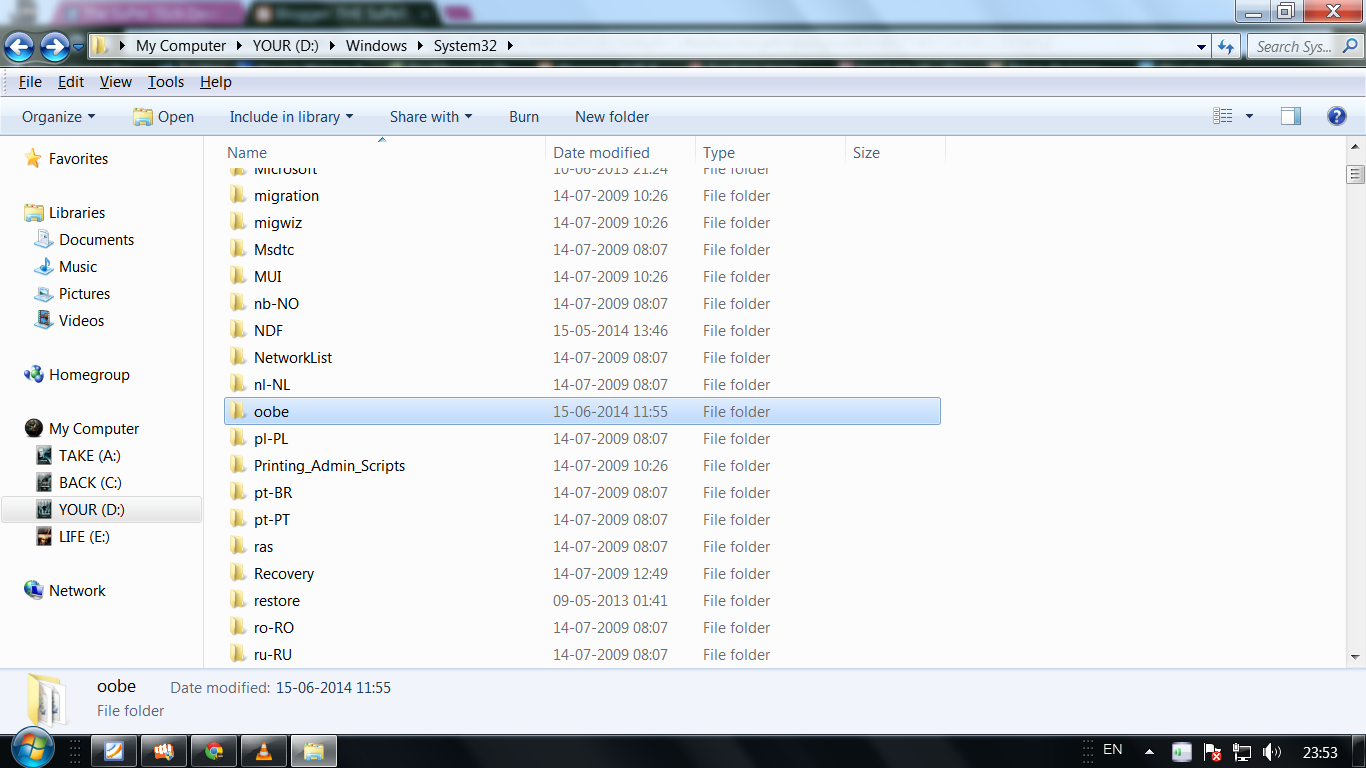
step1 : go to your system drive and click on windows folder
step2 : now click on system 32 folder
step4:now go to folder named oobe                                                                                             
step5: now go to the folder named info  ,inside it there will be a folder background                                                                                       
step6:now copy inside this folder any wallpaper which u want to use and rename it as "backgroundDefault" without quotes.
And bingo u are done 


Apple Edges Into Entry-Level Desktop Market

Apple Edges Into Entry-Level Desktop Market

Apple Edges Into Entry-Level Desktop Market"Power users and gamers will find a 1.4-GHz dual Intel Core i5 processor with Turbo Boost speeds of up to only 2.7 GHz slow going," said ITIC's Laura DiDio. "For corporate workers or consumers who aren't watching a lot of movies or doing a lot of gaming -- just doing routine email and desktop applications that don't strain the limits of the system -- this entry-level Mac will get the job done."

Apple is making a foray into the entry-level desktop market with the introduction of a lower-cost iMac.
The 21.5-inch, all-in-one system features a 1.4 GHz dual-core Intel Core i5 processor. That increases to up to 2.7 GHz with Turbo Boost Speeds. It includes an Intel HD 5000 graphics card, 8 GB of memory and a 500-GB hard drive.
As is standard in iMac systems, this model includes 802.11ac WiFi. Peripheral connectivity and expandability options come in the form of two Thunderbolt ports and four USB 3.0 ports. The base model is priced at US$1,099.
Consumers may choose to bolt extras onto the base model, such as a 1-TB hard drive, a 1-TB Fusion Drive, or flash storage of up to 256 GB.

Entry Level 21.5-inch iMac
Decent Offering'
"From the initial specs, it doesn't look like anything major is missing," Bob O'Donnell, founder and chief analyst at Technalysis Research, told TechNewsWorld.
"It's still a pretty decent-size screen for most people; 21.5 inches is a lot bigger than the 17- and 19-inch monitors most people have. It's still a dual-core Core i5," he noted.
"It's a slower CPU -- 500 GB storage instead of the terabyte most systems have," O'Donnell pointed out.
However, "all in all, it's a pretty decent offering. It would have been really nice if they could have hit $999. That would have been a magical price. We haven't seen that from Apple in a long time. But it's still a good, solid system," he said.
"This is a terrific all-around machine with solid specs that will satisfy most Mac users for this price point," Laura DiDio, principal at ITIC, told TechNewsWorld.
"The segment of Mac users who will most likely give this a pass are leading-edge power users and gamers who absolutely demand extremely robust, state-of-the-art configurations -- beyond the 1.4 GHz dual-core Intel Core i5 processor with Turbo Boost Speeds up to 2.7 GHz that is the standard configuration for this machine," she said. "But strictly speaking, it's not missing anything. Apple is marketing it as an entry-level and not a top-of-the-line fully loaded system, after all."
Like all Mac systems, this iMac ships with the OS X operating system. Owners will have the option to upgrade for free to the latest version, OS X Yosemite, this fall. Apple announced OS X Yosemite at the Apple Worldwide Developers Conference earlier this month.

Productivity Apps

The 21.5-inch, all-in-one iMac ships with the iWork and iLife suites. Productivity apps in iWork, like Pages, Keynote and Numbers, are designed to assist users in creating and editing documents, slideshows, presentations and spreadsheets. Meanwhile, iWork for iCloud offers users the option to create and edit the same synced document across their Apple devices and collaborate with their friends.
However, the lower specifications of the new iMac may make it more difficult for gamers to play top titles or for users to get the most out of the iLife suite of apps. Working with video editing in iMovie, audio in GarageBand, and photos in iPhoto requires perhaps a little more power than the entry-level system might be able to afford.
"This has performance in line with a MacBook Air and well below the more expensive iMac," Rob Enderle, principal at the Enderle Group, told TechNewsWorld.
"Performance should be fine for Web browsing, watching videos, casual games and for using Office. Video- or photo-editing will be far slower, and if it is being used for higher-end games -- typically not an iMac strength anyway -- performance will suffer as well," he noted.

'Slow Going'

"Power users and gamers will find a 1.4-GHz dual Intel Core i5 processor with Turbo Boost speeds of up to only 2.7 GHz slow going," ITIC's DiDio said.
"Many users today want quad-core and i7 processors and double the Turbo boost speeds to support larger, more data-intensive file transfers, and digital video and audio. For corporate workers or consumers who aren't watching a lot of movies or doing a lot of gaming -- just doing routine email and desktop applications that don't strain the limits of the system -- this entry-level Mac will get the job done," she maintained.
"Obviously, if you're doing iMovie and you're doing a lot of editing, that's when faster CPUs are going to make a difference -- but for a lot of people doing basic editing, I don't think it's going to be an issue," Technalysis Research's O'Donnell said.
"If you do a lot of gaming, a better graphics chip is gonna help," he suggested. "Those are the places where you're going to see a bit of a difference. All in all, I think for a lot of people it's going to be a pretty reasonable offering. They're trying to get to a lower price point that gets some customers that may not have previously considered iMacs."
Since Tim Cook took over as CEO from the late Steve Jobs, Apple's strategy has shifted slightly to have more of a focus on volume than premium pricing, Enderle noted.
"Cook's background is very different than Jobs, where Jobs was focused like a laser on maintaining and increasing margins, Cook's operations background focuses him on volumes instead, and this is one of a number of pricing actions he is taking to increase volumes -- mostly at the expense of margins," he explained.
"Much like Apple did in the 1990s before Jobs came back, they are targeting volume PC sellers who typically price below Apple," Enderle observed.

'Apple Goodies'

"For somebody who's looking for all-in-one at a reasonable price point, it's got what you want," O'Donnell suggested.
"It's going to have a free upgrade to Yosemite. It's got iLife and iWork and all the typical Apple goodies. It does have 802.11ac, which is even faster WiFi. It's got pretty much most of the things I think people are gonna want. I don't think there's any really super-critical function it's missing," he added.
"While just over $1,000 list price for a desktop is pricey for traditional x86 Windows-based PC vendors, it's inexpensive for Apple," DiDio noted. "So Apple is targeting the low end or entry level of their market, which may or may not be interested. This market segment may already have moved on to the iPad as an alternative. If sales on this 21.5-inch iMac are sluggish, Apple may drop the price even further within six to nine months, or consider some creative bundles."

Tuesday, June 17, 2014

Flying Drone Buddies Can Capture Your Amazing Exploits

Flying Drone Buddies Can Capture Your Amazing Exploits

Flying Drone Buddies Can Capture Your Amazing ExploitsThe HEXO+ is designed for fast-moving action -- like skiing down a wicked steep mountain -- while the AirDog has more features for static sports or filmmaking, like "hover and aim," which lets it hover in one spot but move the camera to track the subject. You can also set it to slowly circle an area like a skate park or backyard -- or simply hover in one spot and look directly down to video.


There are two new crowdfunded projects that are building self-flying drones to follow you around and video your awesomeness. Geared for adventure sports like skiing, biking or motorcycle riding, these two drones will follow you at high-speed, capturing high-flying jumps and steep dives from angles previously available only to professional filmmakers with powerful cameras and helicopters.
For the outdoor adventure set, these flying cameras are simply insane.
Yet if you watch the video trailers for these projects, some of the coolest bits of footage are relatively mundane -- like a skateboarder slowly weaving down a sidewalk, or an inflatable boat with an outboard motor cutting a wake.
Since it was recently Father's Day in the U.S., imagine a father leading his kids across a grassy field with a frisbee in hand -- and that's it. Shot from the perspective of a flying drone,wow, suddenly the impossible-to-get perspective becomes real, giving amateurs a chance to get aerial shots they previously could only imagine, letting regular people evoke mood and anticipation like never before.
Photo main
The Automatic Flying Camera Drone Projects
The first of these two recent products is HEXO+ by Squadrone System.
The second is AirDog by Helico Aerospace Industries US.
In some ways, the two action-sports solutions are eerily similar: Both feature gimbals that hold GoPro cameras to deliver smooth video. Both will fly 40-plus miles per hour. Both will follow a subject autonomously, even landing on their own. Both feature iOS and Android apps to help set up flight parameters. Both have flight times of around 15 minutes per battery charge.
Both Kickstarter projects feature trailer videos with sick perspectives and inspiring footage.
Differences Between the Two Projects
One key difference between the projects is how the two drones track the subject. The HEXO+ connects to your smartphone using an optimized MAVLINK protocol, in addition to built-in trajectory anticipation algorithms that predict the next, most likely position of the subject. This helps create a more stable images that frame the subject.
The AirDog, on the other hand, uses a smartphone app to help you set up your flight plan, but the actual signals from the subject come from the AirLeash, which is a waterproof computerized tracker that sends signals to the AirDog to tell it where it is. The AirLeash can be worn on your wrist or strapped to a helmet, and it can even be used to help you adjust the flight or angle of the AirDog before you take off and do something cool.
Photo main

In addition to variations in the overall design -- the HEXO+ features six propellers and sleek aerodynamic design, while the AirDog uses just four propellers and looks like a brightly colored flying X -- the two have overlapping but slightly different target markets.

The HEXO+ is designed for fast-moving action -- like skiing down a wicked steep mountain -- while the AirDog has more features for static sports or filmmaking, like "hover and aim," which lets the AirDog hover in one spot but move the camera to track the subject. You can also set it to slowly circle an area like a skate park or backyard -- or simply hover in one spot and look directly down to video.
For situations with obstacles to avoid -- like trees or buildings -- you can run your course with AirLeash to record the position of your subject then use the smartphone app to adjust the trajectory of the AirDog.
Of course, both drones will also enable manual control, too.

The Rewards for Backers

The HEXO+ has a do-it-yourself kit reward for US$299. It features files for 3D printing, a list of components, the autonomous flight controller, and the smartphone app. The early bird base model is gone, but you can still back the HEXO+ for $599 and get a ready-to-fly drone with a stabilizing 2D gimbal with a GoPro mount (GoPro camera is not included).
For $699, you can get a ready-to-film pack, with a HEXO+ drone, gimbal with GoPro mount, and app, plus a GoPro Hero3 White Edition HD camera. To get the better quality GoPro Hero3+ Black Edition 4K camera, the price jumps to $999 (estimated retail price is $1,299).
The AirDog early bird option is gone. The next, and only, option is the AirDog unit itself -- not including a GoPro camera -- at $1,195 (estimated retail price is $1,500).

Will They See the Light of Day?

Both projects appear to have working prototypes and manufacturing timelines set up, greatly reducing the risk of a failed project (though some risk, of course, remains).
As for funding, the HEXO+ blew past its funding goal of $50,000. Backers have pledged more than $340,000 with nearly a month to go. And the timeline from backer to delivery? May 15, 2015.
In February, HEXO+ plans to spend a month testing with pro riders in action and release some of the greatest aerial footage clips. The team plans to make quality improvements in March with final testing and start of production in April.
The funding for AirDog and timeline is a bit different: AirDog backers have pledged nearly $130,000 toward a $200,000 funding goal with more than a month to go. As for delivery, AirDog plans a faster rollout -- AirDog units could make it into the hands of backers by November of this year.

Sunday, June 15, 2014

Pinguy OS Makes Gnome Desktop as Good as It Gets

Pinguy OS Makes Gnome Desktop as Good as It Gets

Pinguy OS Makes Gnome Desktop as Good as It GetsOS is easy to misjudge as being too basic for serious users. There is little to do but launch your applications and go about your computing tasks. It may not satisfy power users who like to control navigation with keyboard shortcuts and advanced system settings. However, if you are a normal computer user who just wants your system to work from the start, Pinguy OS has a lot going for it.
The Pinguy OS is a solid Linux distro with a focus on simple and straightforward usability for the non-geek desktop user.
This approach may disappoint those who favor newer user interfaces, but if you consider yourself a normal computer user who does not like to tinker with settings and various desktop environment options, Pinguy OS could be a good choice.
Pinguy OS is based on Ubuntu's 12.04 LTS release. It uses the Linux Mint infrastructure for package updates. Ubuntu's Software Center and the Synaptic Package Manager serve as the systems for adding or removing software.
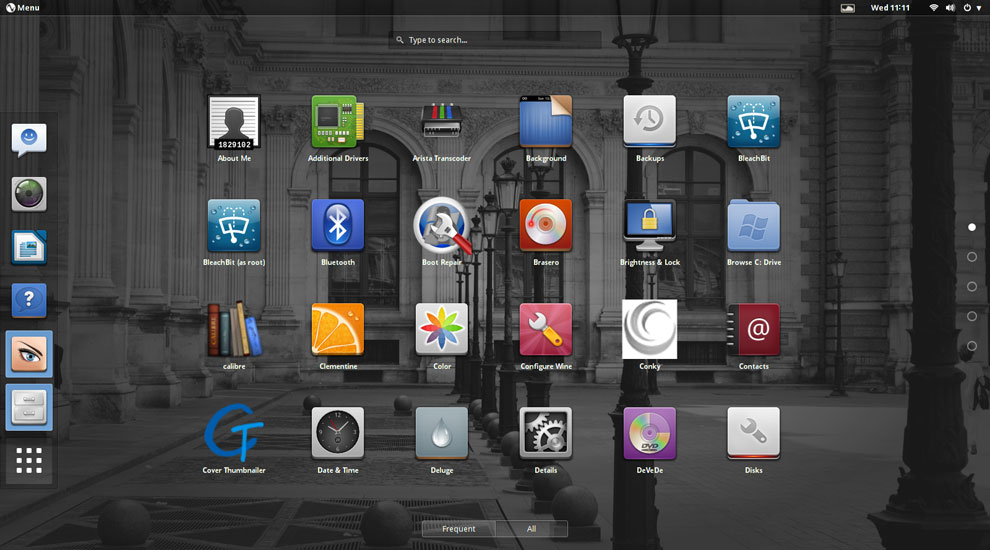
The Gnome desktop is the only user interface option. However, Pinguy OS's developer, Antoni Norman, has tricked it out suitably with a Docky bar combination. The quick launch bar at the bottom of the screen and a hidden Places bar on the left edge make up for the loss of icon launchers from the desktop itself, thanks to Gnome.
Pinguy OS uses a standard GNOME 3 desktop environment for a straightforward computing experience. (click to enlarge)
The Gnome 3 user interface is a bit clunky compared to some of the newer desktop interfaces populating Linux distros. Still, the tweaking done here makes using Pinguy OS a more pleasant experience than it otherwise would be in Gnome 3.
Under the Hood
The latest version of this distro, dubbed "Papercut," was released May 20. It ships with Gnome 3.10, but you can easily upgrade it to Gnome 3.12.2 from the repositories.
Papercut runs on the Linux kernel 3.13.0. The default file manager is the Gnome Files 3.10.1 iteration. If you spend much time working with files, you should supplement this one-pane-only wonder with a more functional file manager such as Nautilus.
Pinguy OS has only one desktop flavor. This supports the developer's goal of making an uncomplicated desktop environment. However, you can choose the full version or the mini edition.
The mini option gives you fewer prepackaged software applications, but you can add the software that's not included with just a few mouse clicks.
Look and Feel
The goal of Pinguy OS is to give users an uncluttered desktop with a fine-tuned interface that works without confusion. It accomplishes that. It is a good out-of-the-box experience.
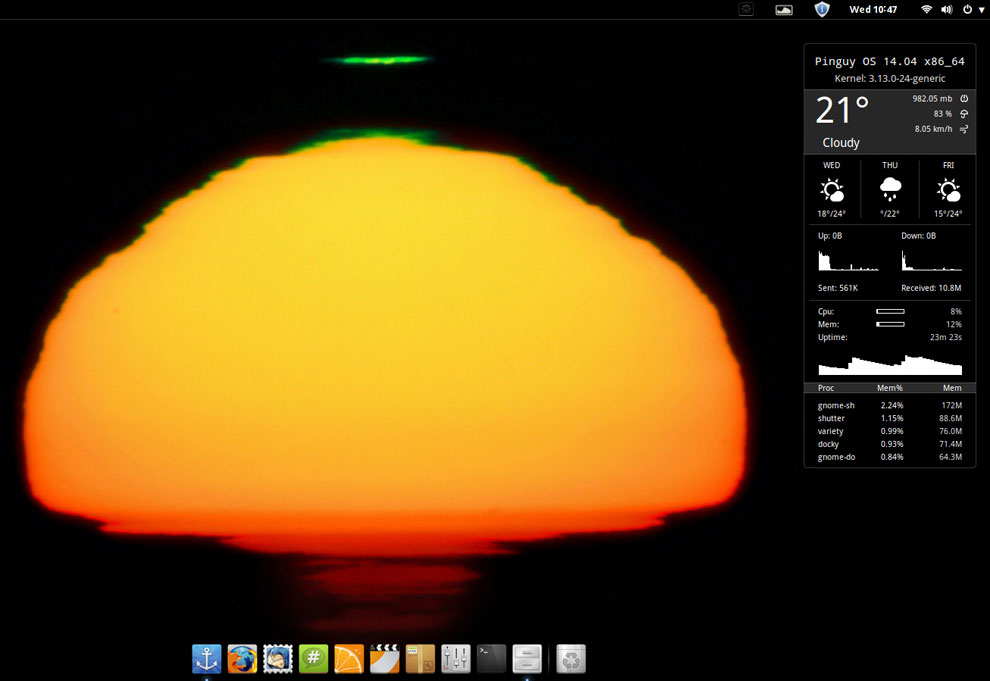
The simplicity starts with a bare-bones desktop background. Rather than letting users choose from a variety of colorful or plain-Jane images, the Pinguy OS automatically displays a collection of eye-catching artwork that randomly changes the background every five minutes or so.
This sunset with dark silhouette is part of a collection of eye-catching artwork that randomly appears as desktop backgrounds during each computing session in Pinguy OS. (click to enlarge)
This process is controlled by the Variety application. You can change the timing interval and other options for the background images in the Variety Preferences panel.
The desktop itself is clutter-free. No icons can be placed there. The only item displayed is the Conky system monitor on the right side of the screen. It shows CPU, RAM, disk and other information.
Limited Desktop Functionality
The Gnome 3 desktop strives for simplicity. Functionality suffers.
A panel bar sits at the top of the screen. It holds the traditional menu button in the left corner and system notification icons on the right half of the bar. You can not add or remove any items from this bar.
A vertical Docky bar slides out from the left screen edge when you move the mouse pointer there. There's a modified Docky launch bar instead of a bottom panel bar.
In addition to a drop-down menu and full-screen applications display, the Pinguy OS uses a modified Docky launch bar instead of a bottom panel bar. The desktop includes a Conky system monitor display on the right side of the screen. (click to enlarge)
The Gnome desktop uses a full screen display to show installed applications. Right-clicking on an icon places the launcher on the Docky bar as a favorite item. An icon on the Docky bar lets you make some limited configuration changes

Stock Software

No quick-start software options are provided for other browser choices, so you have to install what you want through the Ubuntu Software Center or the Synaptic Package Manager.
The only Web browser preinstalled is Firefox, but it includes numerous plug-ins by default. The LibreOffice suite also is provided by default.
Game availability is a weak spot on most Linux distros. This distro takes a minimalist approach. No games are preinstalled. However, the main menu provides a launcher for the PlayOnLinux and the Steam websites.
The other standard menu categories have a spattering of typical Gnome applications. If you are not familiar with these stock desktop titles, you no doubt will opt to replace them with your preferred computing software.

Ready to Go

Pinguy OS caters to the Gnome application standards, but the developer has added repositories and enhancement packages, which provide more software flexibility than the more limited Gnome options.
For most users, the tweaking offers most, if not all, of the packages needed to enjoy video, music and Web content. Some of that success comes from Flash and Java plug-ins already installed.
So you will not have to add extra codecs or specialized software and then struggle to configure them. This all contributes to a pleasant user experience from the first time you run Pinguy OS.

Bottom Line

Pinguy OS may not satisfy power users who like to control navigation with keyboard shortcuts and advanced system settings. However, if you are a normal computer user who just wants your system to work from the start, Pinguy OS has a lot going for it.
This distro is easy to misjudge as being too basic for serious users. I found it much easier to use than other desktop environments. I also found it much less frustrating to set up. There is little to do but launch your applications and go about your computing tasks.
My only dislike is based on my work routine preferences. I run numerous programs categorized on as many as four or five virtual workspaces. I switch among them continuously.
That does not happen conveniently here. The blame falls to the way the Gnome desktop is structured. Pinguy OS is merely the delivery vehicle. The developers have pushed the envelope as much as the Gnome architecture permits without stuffing a separate user shell on top of Gnome like other distros do.

Saturday, June 14, 2014

Samsung Debuts Thin New Tablets With Killer Screens

Samsung Debuts Thin New Tablets With Killer Screens

Samsung Debuts Thin New Tablets With Killer ScreensSamsung's claim that the Galaxy Tab S line has the most advanced display technology is true, said IHS iSuppli's Sweta Dash. Its 8.4-inch tablet offers 359 ppi, compared to the Kindle Fire HDX's 339 ppi. The 10.5-inch Galaxy Tab S offers 288 ppi compared to the iPad Air's 264 ppi. OLED tech enables thinner devices than LCD and a better contrast ratio. However, it costs more to produce, too.


This line "is setting the industry bar higher for the entire mobile industry," said JK Shin, CEO and president of Samsung Electronics' IT & Mobile Division. "It will provide consumers with a visual and entertainment experience that brings colors to life, beautifully packaged in a sleek and ultra-portable mobile device."
The launch comes at a time when it's widely perceived that the demand for tablets is slowing;IDC, for instance, has lowered its forecast for 2014 tablet sales.
"We're not seeing tablet shipments or sales decline," said Jeff Orr, senior practice director for mobile devices at ABI Research.
However, the growth of the category is slowing because advanced mature markets -- the U.S., Europe and Japan -- are pretty much saturated and "are moving towards replacements rather than first-time purchase of devices," Orr told
Galaxy Tab S

Tech Specs for the Tab S Line

The Galaxy Tab S devices use WQXGA Super AMOLED displays with a resolution of 2560 x 1600 pixels and a 16:10 ratio.
The screens deliver more than 90 percent of Adobe's RGB color coverage, according to Samsung. They have a 100,000:1 contrast ratio, which provides deeper and more realistic images.
Further, the screens' Adaptive Display feature intelligently adjusts gamma correction, saturation and sharpness based on the application viewed, the viewing environment's color temperature, and the ambient lighting.
The Galaxy Tab S devices also use advanced outdoor visibility technology that makes it easy to view content outdoors in bright sunlight, Samsung said.
Both the 8.4- and 10.5-inch tablets are slim -- measuring 6.6 mm deep -- and have extended battery life because Super AMOLED technology does not require a backlight.
Users can make and receive calls directly from their phones to their Galaxy Tab S devices with call forwarding. They also can surf the Web, watch videos, share content and make calls simultaneously.
The tablets, which will be available in WiFi-only, LTE-only, and both WiFi and LTE versions, have a Quick Connect feature that finds and connects to nearby devices for easy content sharing.
They will be available in July. The tablets can be preordered from a number of outlets, including Sears, Best Buy and Amazon, at a price of US$399 for the 8.4-inch and $499 for the 10.5-inch WiFi models.

Breaking Down Screen Issues

Samsung's claim that the Galaxy Tab S line has the most advanced display technology is true, but the Kindle Fire HDX gives them a run for their money, Sweta Dash, director of display research and strategy at IHS iSuppli, told TechNewsWorld.
"Their 8.4-inch tablet offers 359 ppi, which is higher than what we have up to now, and the 10.5-inch 288 ppi, but the Kindle Fire HDX offers 339 ppi," Dash pointed out. The iPad Air offers just 264 ppi.
Samsung "spent a good amount of time during its launch event talking about tablet usage and how long-form video is increasingly used, leading to the desire for the highest-quality displays available," ABI's Orr said.
OLED technology enables thinner devices than LCD screens because it doesn't require backlights. It also offers a better contrast ratio, especially when viewing videos, Dash said.
Galaxy Tab S
However, OLED screens cost about 10 percent to 30 percent more to produce than LCD screens, Dash said.

Possible Demand for Galaxy Tab S Devices

The Tab S line constitutes Samsung's higher-end models, and will target a different audience than the Galaxy Note and Galaxy Tab lines, Orr remarked. Prices of the Tab S line "are in line with this expectation."
However, the demand for high-end products with QXGA then comes into question, iSuppli's Dash suggested.
"Wide QXGA is nothing new in LCD, but only a small part of the market buys these high-end products," she said. "Most of the market buys low-end or mid-range devices."

Friday, June 13, 2014

Next iPad May Be Loaded With iPhone Hand-Me-Downs

Next iPad May Be Loaded With iPhone Hand-Me-Downs

Next iPad May Be Loaded With iPhone Hand-Me-Downs

Tablets evolved very quickly, and now they've gotten to a level that's pretty darn good.
... I think the reason they're starting to take a hit is that people are realizing they don't need to upgrade because there isn't enough change to make a difference," said Bob O'Donnell, chief analyst at Technalysis. "Even the iPad Air ... didn't do as well as a lot of people expected it to do."

In large families, it's common to pass on an older child's clothes to a younger one. The same is true in the Apple product family. It's common to pass on features introduced in the big brother iPhone to the little brother iPad. That appears to be the case with the next-generation iPad Air -- if the latest gaggle of rumors are to be believed.
"Historically, there's been a relationship between the iPhone and iPad product launches in that the iPad inherits what was most recently introduced on iPhone," Jeff Orr, senior practice director for mobile devices at ABI Research, explained to TechNewsWorld.
"What we haven't seen to this point is new advancements appearing on the iPad and then making their way over to the iPhone," he said.
The next iPad will get Apple's Touch ID fingerprint reader and a camera upgrade to put it on par with the iPhone 5s. The front-facing camera will be bumped from 1.2 megapixels to 1.5 MP, and the rear-facing camera from 5 MP to 8 MP. It also may support a dual LED flash, burst mode for stills, and a slow motion mode for video.
It's likely to receive the same processor upgrade that the next iPhone is expected to get, moving from the dual-core, 64-bit A7 chip to the quad-core A8 chip. Since the A7 already outperforms many mobile quad-core chips from other manufacturers, the prospect of an Apple quad-core processor is building anticipation among some of the company's fans.

Growth Slowing

So it seems that most of what will be new in the next iPad will be old hand-me-downs from the iPhone. That could affect the product's greeting in the market.
"Audiences that are fans of Apple products expect the company to innovate and to constantly revolutionize their experiences with these devices," Orr said.
Apple's challenge in the tablet market that it created is shared by the market as a whole -- sales are slowing. For the quarter ending in April, Apple saw a 16 percent decline in tablet sales compared with the same period in 2013, according to IDC data. The overall market didn't do much better, growing at a disappointing 3.9 percent during the previous 12 months.
"Tablets evolved very quickly, and now they've gotten to a level that's pretty darn good. ... I think the reason they're starting to take a hit is that people are realizing they don't need to upgrade because there isn't enough change to make a difference," Bob O'Donnell, founder and chief analyst with Technalysis, told TechNewsWorld.
"Even the iPad Air, which was a big improvement over previous iPads, didn't do as well as a lot of people expected it to do," he added.
Sales -- especially for the iPad mini -- also may be hurt by competition.
"They've got a lot of competition in the smaller-size segment where there is a large price gap between the 7-inch Android devices and the mini," Ross Rubin, principal analyst with Reticle Research, told TechNewsWorld.

OS-Driven Upgrades

Getting people to upgrade their hardware has been challenging since the invention of the PC.
"One way that Apple has addressed that previously has been with operating system updates," Rubin explained. "While they generally will run adequately on old hardware, they'll run best on the latest and greatest hardware."
Such an operating system update will be released around the time of the next iPad. While the next iPad may be thin on new features, the next iOS is not, so the tablet may get some sales legs from the new operating system.
Indeed, the future of innovation on the iPad may rest not with the hardware but with software developed for it.
"The radical departures aren't going to be from the hardware platform, but at the system level in terms of software, iOS and APIs," ABI's Orr said.
"Apple can't solve the needs of every market and every audience," he noted, "so by enlisting the support of its developers, they can extend the capabilities of iOS and the iOS devices to do more."